

Claude AI Slash Commands Explained: Real vs Community Hype
- Posted on August 1, 2026
- AI Tools
- By MmantraTech
- 239 Views
Most Claude slash commands like /godmode and /devil are not official Anthropic features. Here is which ones actually are, how the rest work anyway, and where each one behaves differently across Claude.ai, Claude Code, and the VS Code extension.
Type /godmode into Claude and hit enter. Nothing breaks, nothing unlocks, no hidden menu appears. But the answer you get back often does look sharper and more "expert" than a plain question would produce — and that gap is exactly why Claude slash commands like /godmode, /devil, and /ghost keep spreading across X, Reddit, and YouTube.
Here's the part almost nobody mentions: outside of Claude Code, almost none of these are real features. Anthropic never shipped a "god mode." In this breakdown, we'll separate what's actually built into Claude from what's community shorthand, explain the mechanism that makes the self-made ones work anyway, and — most importantly — show you exactly where each one behaves differently across the Claude.ai app, the Claude Code terminal, and the VS Code extension, with a plain example for each.
Table of Contents
- The cheat sheet: what's official and what isn't
- How unofficial commands work without any code behind them
- Where each command actually works: Claude.ai vs Claude Code vs VS Code
- Every command explained with real examples
- The universal prompt: all the benefits, no slash needed
- Quick cheat sheet: one line per command
- Key takeaways for power users
The cheat sheet: what's official and what isn't
Before touching the mechanics, here's the honest split between things Anthropic actually built and things the internet made up and agreed to share.
| Command / Concept | Official? | What It Actually Is | Intent in Plain English |
|---|---|---|---|
| Artifacts | YES ✓ | Built-in UI window | "Open a dedicated workspace to generate, preview, and edit standalone content like code or web apps." |
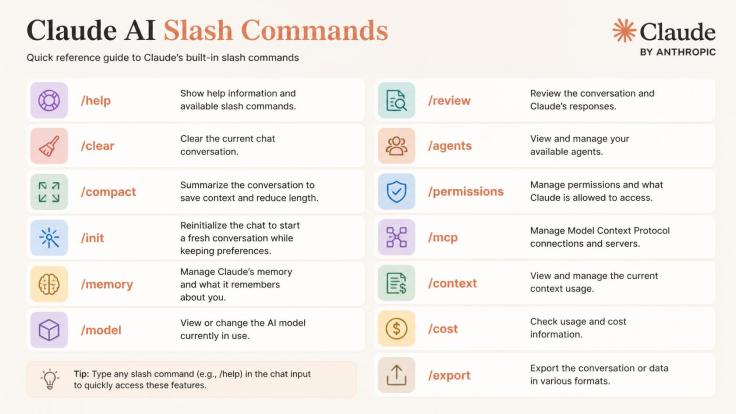
| Official CLI Commands/help, /clear, /compact, /init, /memory | YES ✓ | System-level CLI triggers in Claude Code | "Perform direct actions in the terminal interface — clear context, check memory, initialize setup." |
| /ghost | NO ✕ | Community convention | "Do all your heavy thinking internally; just show me the polished, final output." |
| /godmode | NO ✕ | Community convention | "Act as an elite expert and give me comprehensive, top-tier advice without holding back." |
| OODA | NO ✕ | Decision-making framework | "Analyze this problem using the Observe, Orient, Decide, Act process." |
| L99 | NO ✕ | Gaming shorthand ("Level 99") | "Think with maximum depth; handle edge cases, scalability, and trade-offs." |
| /render | NO ✕ | Community convention | "Give me the final, working build directly — don't write an essay explaining how to build it." |
| PERSONA | NO ✕ | Prompting technique | "Adopt a specific identity, mindset, and background knowledge." |
| /devil | NO ✕ | Community convention | "Play devil's advocate. Attack my assumptions and find every single flaw in my plan." |
| /silent | NO ✕ | Community convention | "Output zero fluff. No intro, no outro, no conversational filler — just the code or text." |
Rule of thumb: if a command isn't in Claude Code's own
/helplist and you haven't defined it yourself, it isn't "real" in the sense of triggering special code. It's a shared convention that works because of how language models read text — which is exactly what the next section explains.
"These are prompt tricks people invented and spread as if they were real features. Anthropic didn't build any of them. The only place slash commands are real is Claude Code, and even there, someone has to build the specific command themselves — it's not built in"
How unofficial commands work without any code behind them
If Anthropic never programmed a /devil feature, how does Claude respond to it at all? Large language models don't run your message through a terminal-style parser looking for known keywords. They process natural language and the associations attached to every word in it. Three separate things are doing the actual work.
1. Anchor words and semantic priming
Claude already knows what "devil" and "silent" mean in plain English. Put a strong word right at the front of your message and it acts as a style anchor — it steers tone and behavior the same way starting an email with "URGENT:" changes how a person reads the rest of it. The slash isn't doing anything special here; the word after it is.
2. Wrapper software that intercepts the slash
This is the one exception. In developer tools like Claude Code, the terminal application itself reads your input before it ever reaches the model. If your message starts with /, the CLI checks it against a list of real commands first. This is a genuine software feature — just not the one people assume when they type /godmode into a chat window.
3. Custom instructions you defined yourself
If you've told Claude in a Project's custom instructions, or defined a real Claude Code command, that "/silent means omit all conversational text," then of course it works afterward — because you built that rule, not Anthropic.
Where each command actually works: Claude.ai vs Claude Code vs VS Code
This is the part most explainers skip, and it's the part that actually matters if you use Claude across more than one surface. The same four characters — /godmode — do three completely different things depending on where you type them.
Claude.ai — the web and mobile chat app
There is no command parser here at all. Every character you type, slash included, is sent to the model as plain text. That means /godmode, typed with the slash, and godmode without it, or the fully spelled-out sentence, all reach Claude in essentially the same way — through word meaning, not software logic.
Example — with the slash:
/godmode Design a production-ready authentication system covering JWT, refresh tokens, rate limiting, and a deployment checklist.Example — spelled out, no slash, same effect:
Act as a senior security engineer. Design a production-ready authentication system covering JWT, refresh tokens, rate limiting, and a deployment checklist. Don't summarize — go deep.
Both prompts realistically produce the same kind of answer: a JWT strategy with expiry reasoning, a refresh-token rotation section, a rate-limiting approach referencing token buckets or sliding windows, and a closing deployment checklist. The slash added a mood, not a mechanism — the second version usually performs just as well, sometimes better, because the instruction is explicit instead of implied.
Claude Code — the terminal CLI
Here the slash genuinely means something. Claude Code checks anything starting with / against its own command list before the message goes anywhere near the model. Official commands like /clear, /compact, /init, and /memory run instantly and locally — /clear, for example, wipes your context window without spending a single token on a reply.
An unofficial word like /godmode is not automatically forwarded as a normal chat message the way it would be in the web app — Claude Code treats the leading slash as a command lookup first. If nothing matches, you won't get the "elite expert" behavior you were hoping for just by typing it.
You have two working options instead:
- Drop the slash and type the instruction as plain English — this always works, in every surface.
- Build it as a real command — create a file at
.claude/commands/godmode.md(or a Skill at.claude/skills/godmode/SKILL.md) containing your own instructions, with$ARGUMENTSstanding in for whatever text follows the command name. Now/godmode Design an auth systemis a genuine, working command, because you wrote the code behind it.
Example output difference:
/clearin Claude Code visibly resets your conversation — that's real, deterministic behavior. Typing an undefined/godmodein the same terminal either gets flagged as unrecognized or does nothing useful, depending on your CLI version — it will not silently switch Claude into a more advanced mode, because no such mode exists.
VS Code and JetBrains extensions
The Claude Code extension for VS Code (and equivalent IDE integrations) runs the same underlying engine as the terminal CLI, not a separate one. That means the exact same rules apply: official commands work, custom commands you've defined in .claude/commands/ work project-wide, and an undefined slash word behaves the same as it does in the terminal — it won't be treated as a special instruction just because it looks like one.
Every command explained with real examples
Artifacts — the one genuinely built-in feature
Unlike a chat reply, an Artifact opens in a separate panel next to the conversation. It triggers automatically when you ask for something substantial and standalone — a full codebase, a single-page app, a complex SVG, or long-form documentation — no slash required.
Example prompt:
Create an interactive HTML educational game for children aged 5 to 7. Use a bright UI, large buttons, and teach addition using fruits and animals in a single mobile-responsive HTML file.
Claude opens a live preview panel with the working game, editable and re-runnable without cluttering the chat itself.
Prompt pairs to demo
The clearest way to see the difference is to ask for almost the same thing twice — once phrased as a normal question, once phrased to demand a deliverable.
Inline chat vs. artifact
"What's a bubble sort algorithm?" → Claude explains in plain text, maybe a small code snippet inline.
"Write a bubble sort algorithm in Python as an artifact" or "Create a working bubble sort visualizer" → opens a separate code/interactive panel.
Short answer vs. document
"Give me 3 tips for a good resume" → a short text list in chat.
"Write a full resume template for a marketing manager" → opens as a standalone document artifact your audience can edit and export.
Explanation vs. interactive tool
"Explain how compound interest works" → a text explanation.
"Build me an interactive compound interest calculator" → opens a working calculator app in the artifact panel.
Text vs. visual
"List the planets in order from the sun" → a plain text list.
"Create a diagram showing the planets in order from the sun" → an SVG or diagram artifact.
Explicit trigger word
"Create this as an artifact: a simple to-do list app" → forces the artifact panel even for something that could've been answered inline.
Artifacts turn Claude's answer into something reusable — a file, app, or visual you can open, edit, and keep — instead of just words in the chat that scroll away.
/ghost vs /silent — the common mix-up
Both ask for a cleaner answer, but they're not the same request.
/ghost means: think it through internally, only show the finished conclusion. It's for reasoning-heavy tasks where you don't want to read the scratchpad.
/ghost Audit my Laravel application for N+1 query problems. Do all the analysis internally and return only the final list of fixes.
Realistic output: a short numbered list of specific files and lines with the fix applied — no "let me think through this step by step" narration in between.
/silent means: skip the conversational wrapper entirely — no "Sure, here's your code!" and no closing remarks.
/silent Write a PostgreSQL query to find duplicate emails in a users table. Return SQL only.
Realistic output: a single SQL block, nothing before or after it.
/godmode and L99 — asking for maximum depth
Neither one unlocks a hidden capability or bypasses safety behavior. Both just tell Claude you don't want a summary — you want full technical depth, trade-offs, and edge cases spelled out.
/godmode:
Design a production-ready authentication system including JWT, refresh tokens, rate limiting, and a security deployment checklist.L99:
Design a scalable learning management system capable of handling 10 million concurrent users.
Both realistically return a multi-section answer: architecture decisions with reasoning, a scalability discussion (sharding, caching, queueing), and a list of trade-offs — the kind of answer you'd expect from a written design doc, not a chat reply.
/devil — turning Claude into your critic
Models default to being agreeable, which often means quietly validating a plan instead of stress-testing it. /devil flips that default.
Review my startup's business plan. Find every hidden flaw, challenge my financial assumptions, and tell me why this might fail.
Realistic output: a blunt, structured list of weak assumptions — unrealistic churn numbers, an unvalidated pricing model, a customer acquisition cost that doesn't match the stated budget — instead of encouragement.
OODA — the observe-before-you-answer framework
OODA is one of the most useful thinking frameworks to attach to a prompt, because it forces Claude to analyze first, then recommend — instead of jumping straight to a conclusion.
OODA = Observe → Orient → Decide → Act. It's a military decision-making loop originally, but it maps cleanly onto how a good consultant reasons through a problem.
Think of it like a doctor: Observe gathers the symptoms, Orient compares them against medical knowledge, Decide identifies the likely illness, and Act recommends treatment. Nothing gets prescribed before the first three steps happen.
Attach it to a prompt and Claude works through the same four stages in order, instead of skipping straight to a recommendation:
Use the OODA framework. I want to build an AI-powered online learning platform.Observe
— Analyze the current market.
— Identify competitors.Orient
— Compare strengths and weaknesses.Decide
— Is this a good business?
— Which niche should I target?Act
— Give me a 6-month roadmap.
Realistic output: a short market scan naming a handful of real competitors, a strengths-and-weaknesses comparison, a clear yes-or-no verdict with a recommended niche, and only then a month-by-month roadmap — in that order. Ask the same question directly without OODA, and Claude tends to jump straight to the roadmap, skipping the market validation that should have come first.
/render and PERSONA
/render asks for the finished product, not a tutorial about building it.
Create a responsive landing page for a SaaS product. Return complete HTML, CSS, and JavaScript.
Realistic output: the full working files, ready to paste and run — not a paragraph explaining what a landing page is.
PERSONA assigns an identity so Claude's vocabulary and standards match that role.
You are a senior software architect with 15 years of infrastructure experience. Audit my database design.
Realistic output: feedback framed the way a senior architect would give it — normalization concerns, indexing choices, and scaling risk, not a beginner-level explanation of what a foreign key is.
The universal prompt: all the benefits, no slash needed
If you want what /godmode, /ghost, /devil, and PERSONA are all reaching for, without relying on shorthand that behaves inconsistently across surfaces, combine their intent into one structured prompt you can reuse anywhere — Claude.ai, Claude Code, or the VS Code extension.
The master prompt template:
"Act as a senior software architect. Analyze the problem thoroughly. Challenge my assumptions where appropriate and identify hidden risks. Consider scalability, security, performance, maintainability, and cost. Do the reasoning internally, and present only the final recommendations with clear explanations and an implementation roadmap."
This single paragraph carries the depth of /godmode, the internal reasoning of /ghost, the scrutiny of /devil, and the framing of PERSONA — and it works identically whether or not the surface you're using even has a command parser.
Quick cheat sheet: one line per command
Bookmark this part. Once you know a command is unofficial and understand why it works, the only thing worth remembering day-to-day is when to reach for it.
| Convention | Think of it as… | Best for |
|---|---|---|
| /render | "Just build it." | HTML, React, APIs, reports, resumes, documentation |
| /devil | "Try to prove me wrong." | Code reviews, business ideas, architecture, security, resumes |
| /ghost | "Work quietly and show only the result." | Coding, debugging, research |
| /silent | "Output only the requested content." | SQL, JSON, translations, code snippets |
| OODA | "Investigate before you advise." | Business plans, market research, technical decisions |
If you remember just one sentence for each:
- /render → "Generate the finished product."
- /devil → "Criticize my idea like a tough reviewer."
- /ghost → "Work in silence, hand me only the result."
- /silent → "Give me just the output, nothing else."
- OODA → "Observe, orient, decide, then act — in that order."
Key takeaways for power users
- Focus on intent, not syntax. Slash commands work because they compress clear intent into a shorthand word. If an unofficial one doesn't behave the way you expect, just write out the intent in plain language — it works everywhere, every time.
- Know which surface you're on. In Claude.ai, every "command" is really just a strong opening word. In Claude Code or its VS Code extension, only
/help-listed commands and the custom ones you've built in.claude/commands/actually run as commands. - There's no hidden god mode. Better output always comes down to clearer instructions, explicit context, and constraints you actually spelled out — not a secret unlock string someone found on Twitter.
Next time you're tempted to type /godmode out of habit, try writing the sentence it's standing in for instead — you'll get the same result, and it'll work no matter which Claude surface you're using.



Write a Response