

Create Your Own AI App with Claude in Minutes – No Coding, No API Key!
- Posted on October 31, 2026
- AI Tools
- By MmantraTech
- 8 Views

You watch a full tutorial on JavaScript closures. The teacher sounds confident, you nod along, and ten minutes later someone asks you what a closure is. Blank. Sounds familiar, right?
Usually you are not the problem. The explanation was simply pitched at the wrong level. So in this tutorial we will plan an AI coding tutor with Claude Artifacts. You type one topic and get three explanations: a simple analogy, working code, and an interview-ready answer. You will see how the app works, how to prompt Claude to build it, and what "no API key" really means.
Table of Contents
- Why one explanation is never enough
- What we are building
- One topic, three cards: JavaScript closures
- What happens when you click Explain
- The "no API key" part, explained honestly
- The prompt to build your AI coding tutor
- The logic behind the button
- Topics to test your tutor with
- Same pattern, other AI apps
- FAQ
- Conclusion
Why one explanation is never enough
Think about how you actually learned anything difficult. First somebody gave you a rough picture. Then you tried it yourself and broke it. Only after that did the proper definition start making sense.
Most tutorials jump straight to the definition. Most blog posts give you one level and hope for the best. And if you are preparing for an interview, you want the opposite: no story, just the precise words.
So the same topic needs three different teachers:
- The friend who explains it with a real-life example.
- The senior dev who says, "forget theory, look at this code."
- The interviewer who wants the exact terminology.
That is the whole idea behind this app. Honestly, it is a small idea. But small ideas are the best ones to build first.
What we are building
We will call the app Code Concept in 3 Ways. Nothing fancy. It runs as a Claude Artifact, which is an interactive page that Claude creates right beside your chat. You can use it, come back to it, and share it by link.
A Claude Artifact is a standalone piece of work, like a document, dashboard or small interactive tool, that Claude creates beside your conversation. What it can do depends on the features available in Claude at that time.
Here is everything the app needs:
- One text box for the topic
- One Explain button
- A loading message while the answer is being written
- Three result cards
- A friendly message for an empty box
- A useful error message when something fails
Six things. That is it. If you have built a to-do app, you already understand most of this screen. The interesting part is the prompt sitting behind that button.
One topic, three cards: JavaScript closures
Let's use closures as the test topic, because almost everybody struggles with them at some point.
Card 1: The simple analogy
I wrote about closures and nested functions on this blog before, and the backpack is still my favourite way to explain them.
A student leaves the library. The library closes. Normally that means no more books, but this student packed a few in a backpack and can read them at home. A closure works the same way: a function carries the variables it needs, even after the place it came from has finished.
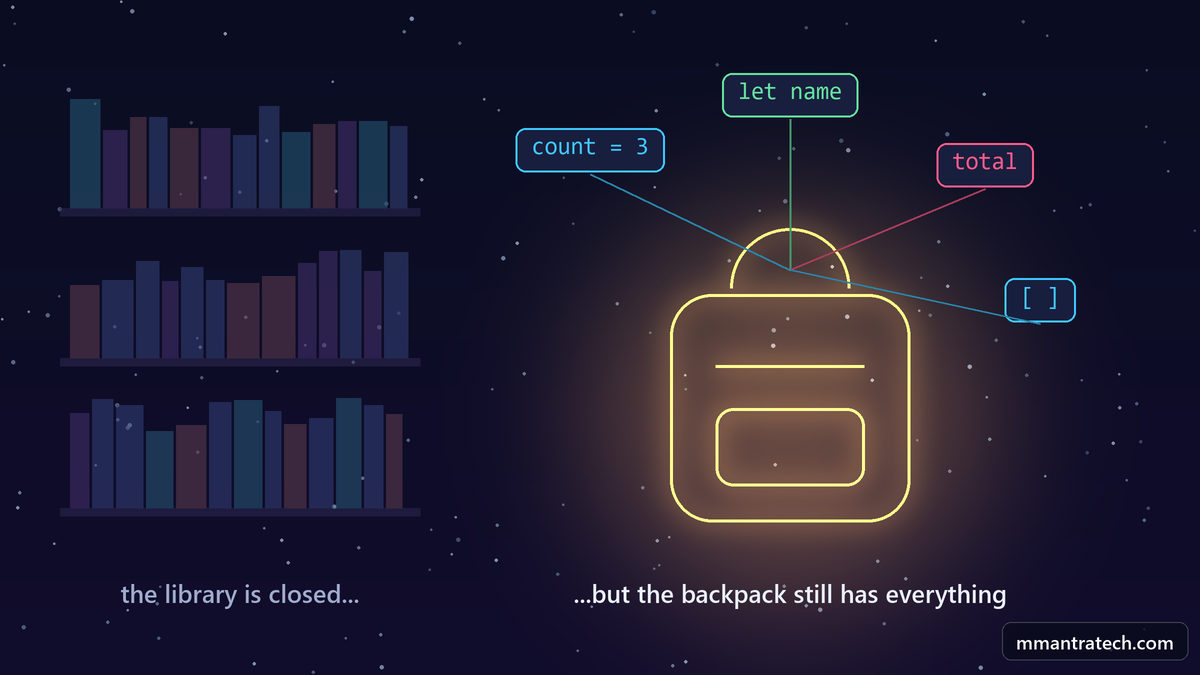
No jargon yet. A complete beginner can follow that, and that is exactly what this card is for.
Card 2: The practical code
Now the senior dev walks in. Enough stories, let's run something. This small counter is all you need:
// A counter that remembers its value using a closure
function makeCounter() {
  let count = 0;

  return function () {
    count++;
    return count;
  };
}

const counter = makeCounter();

console.log(counter()); // 1
console.log(counter()); // 2
console.log(counter()); // 3
Step by step, here is what happens:
makeCountercreates a local variable calledcount.- It returns an inner function and then finishes.
- That inner function still has access to
count. - Every call to
counter()updates the same variable, so we get 1, 2, 3.
Normally you would expect count to vanish when makeCounter finishes. It doesn't, and that surprise is the closure.
Card 3: The interview answer
Same concept, but now every word has to be correct:
A closure is the combination of a function and its surrounding lexical environment. It lets the function access variables from its outer scope even after the outer function has returned.
Then add where it is used, because interviewers love that follow-up: data privacy, function factories, callbacks and keeping state between calls.
See what happened? One topic, three levels, and nobody had to open three different tabs.
What happens when you click Explain
This is the part most beginners skip, and it is the most useful part. The AI is only one step in the flow. Everything around it is normal app development.
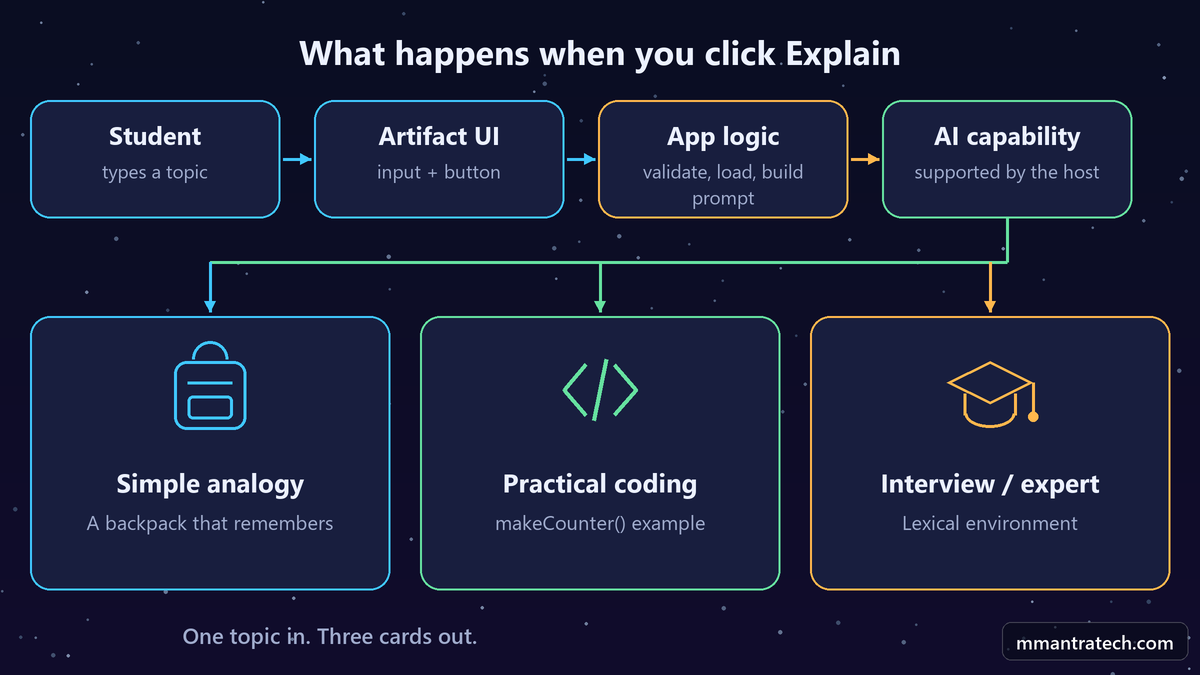
- The student types "JavaScript Closures" and clicks Explain.
- The app checks that the box is not empty.
- It shows a loading message and blocks repeat clicks.
- It builds one instruction containing the topic and all three explanation styles.
- The AI capability available in that Artifact generates the content.
- The app splits the response into three parts.
- Each part lands in its own card.
Look at that list again. Only step 5 is AI. The rest is input handling, state and rendering, the same things you do in any web app. So if you feel AI apps are some different world, they really aren't.
The "no API key" part, explained honestly
This is where a lot of videos and posts get careless, so let's slow down. There are two very different setups here, and the rules are not the same.
Inside Claude: a hosted Artifact
When your app runs inside Claude, the platform handles AI access. Anthropic describes this as adding Claude to an artifact with nothing to set up. Nobody pastes a key.
The trade-off is simple. Each person signs in with their own Claude account, and their use counts toward their own plan. So if your friend uses your tutor, your friend's usage goes down, not yours. If you want to know how quickly that usage can go, I covered it in why your Claude AI credits disappear so fast.
Outside Claude: your own website
Now say you want the same tutor on your own domain. Different story. Your browser talks to your backend, your backend talks to the Anthropic API, and that needs a key.
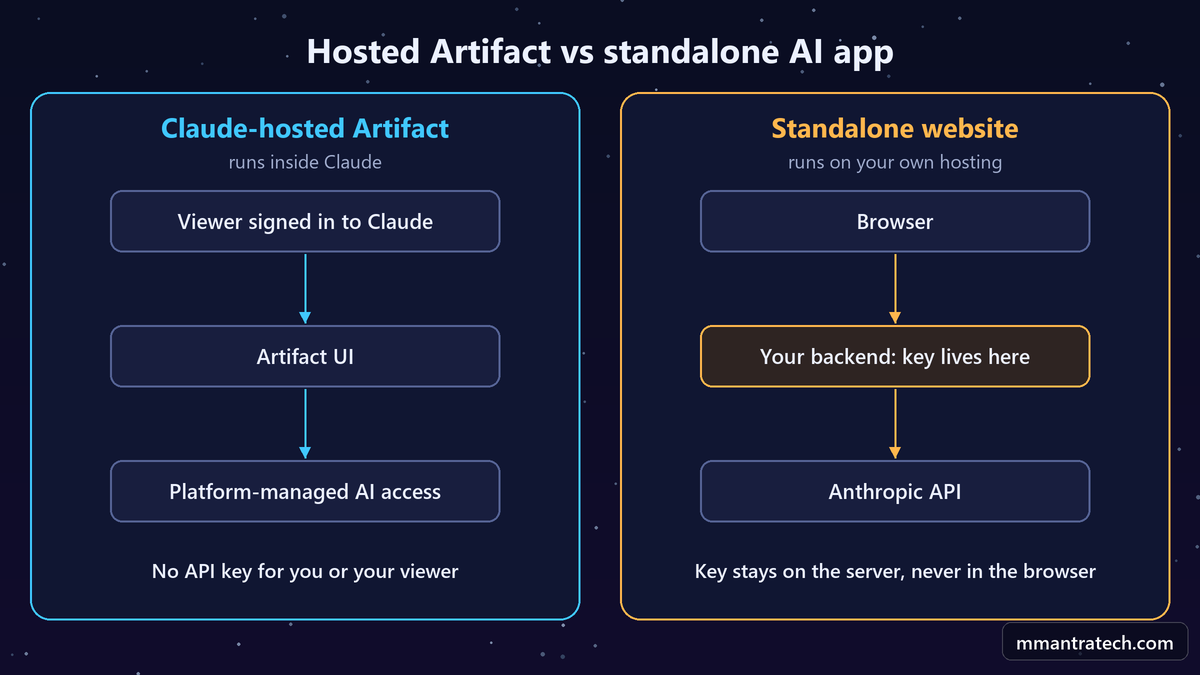
| Hosted Artifact | Standalone website | |
|---|---|---|
| Where it runs | Inside Claude | Your own hosting |
| API key | None for the user to paste | Required, kept on your server |
| Who is signed in | Each user, with a Claude account | Whoever your own app allows |
| Who pays for usage | Each user, through their own plan | You, through your API account |
| Backend needed | No | Yes |
| Best for | Prototypes and small tools | Your own product and brand |
Security rule: Never put an API key in browser JavaScript, public source code, or a frontend environment variable that gets bundled into the client. Anyone can open DevTools and read it. Keep it on the server, and protect your endpoint with authentication and rate limits.
So don't say "you never need an API key for Claude apps." That is not true. The correct line is longer but honest: a supported hosted Artifact can use platform-managed AI, while a standalone app still needs authorized API access.
The prompt to build your AI coding tutor
Here is the fun part. Open Claude, paste this, and let it build. Notice that the prompt describes behavior, including failure, and never tells Claude which function to call.
Build an interactive Artifact called "Code Concept in 3 Ways".
Subtitle: "Understand any programming concept at three levels."

Screen:
- One text input, placeholder "e.g. JavaScript Closures, Python OOP, React Hooks"
- One button labelled "Explain"
- Three responsive result cards
- Clean design, readable type, accessible contrast, works on mobile

When the user clicks Explain, use Claude from inside this Artifact,
using only the method the current Artifact environment supports.
Do not invent an endpoint or SDK. Do not ask the user for an API key.

Ask for three clearly separated sections:
1. Simple Analogy: explain to a complete beginner with a real-world analogy.
2. Practical Coding: a small, correct code example with comments and a
   step-by-step explanation. Pick the language that fits the topic.
3. Interview / Expert: precise terms, common uses, and a short
   interview-ready answer.

If the topic is ambiguous, state the assumption you made.
Prefer a structured response with the fields simple_analogy,
practical_coding and interview_expert.

Behavior:
- Show a friendly message if the input is empty
- Show a loading message and block repeat clicks during a request
- On failure, show a useful error and keep the topic in the input
- Never show sample content as if it were a live AI result

If this environment cannot call Claude from an Artifact, tell me
plainly and suggest a supported alternative. Do not fake the result.
Why this prompt is written like this
Three lines are doing the heavy lifting here.
- "Use only the method the environment supports" stops Claude from guessing. These details change, and code copied from an old blog post may not work today.
- "Prefer a structured response" makes your life easy. Three named fields are far simpler to place in cards than one long paragraph.
- "Do not fake the result" is the honest exit. A hardcoded demo can look perfect while no AI is running at all.
Also, don't expect to control everything. A specific model name or a token limit may or may not be available inside an Artifact, so treat those as requests, not guarantees. If you want to see what else Claude can do beyond chat, read Claude AI features beyond the chatbot.
The logic behind the button
You don't have to write this yourself, because Claude will generate it. But you should be able to read it. Here is the flow as pseudocode. It is not real code and not a real Claude function, so please don't copy it into a project.
# Conceptual pseudocode only, not a real API
on Explain click:
    if topic is empty:
        show validation message
        stop

    set loading = true
    clear previous error

    prompt = instructions + topic

    try:
        response = call supported AI capability(prompt)
        sections = parse response
        show sections in the three cards
    catch error:
        show friendly error, keep the topic
    finally:
        set loading = false
Where it will probably break first
When you test your version, try to break it on purpose. These are the things I would check first:
- Empty and silly input: Click Explain with nothing typed. Then try a single letter.
- Double clicks: Hit the button three times fast. You should get one request, not three.
- Ambiguous topics: Type "hooks". Git hooks or React hooks? A good tutor states its assumption.
- Messy responses: If the answer arrives in an unexpected format, the app should show an error, not three blank cards.
- Failures: The topic should still be in the box after an error, so the student doesn't have to type it again.
And one more thing. AI can be wrong while sounding completely sure of itself. So run the code from Card 2 yourself. As I said in AI are our friends, not our owners, the tool should help you understand, not replace understanding.
Topics to test your tutor with
One topic proves nothing. Try a mix of languages and ideas to see if your AI coding tutor really is reusable:
- Python OOP: A blueprint and the houses built from it.
- REST API: A waiter carrying your order to the kitchen.
- React Hooks: Memory and lifecycle tools for a component.
- Python decorators: Gift wrap around an existing gift.
- SQL joins: Matching two lists using a common ID.
- Docker: A packed lunch box carrying everything the app needs.
Don't just check whether the answers appear. Check whether Card 1 is actually simple. If your "beginner" card uses words like "instantiate", go back and tighten the prompt.
Same pattern, other AI apps
Now the best part. Once this works, you haven't just built one app. You have learned a pattern:
One input → clear instructions → AI response → structured output → separate UI cards.
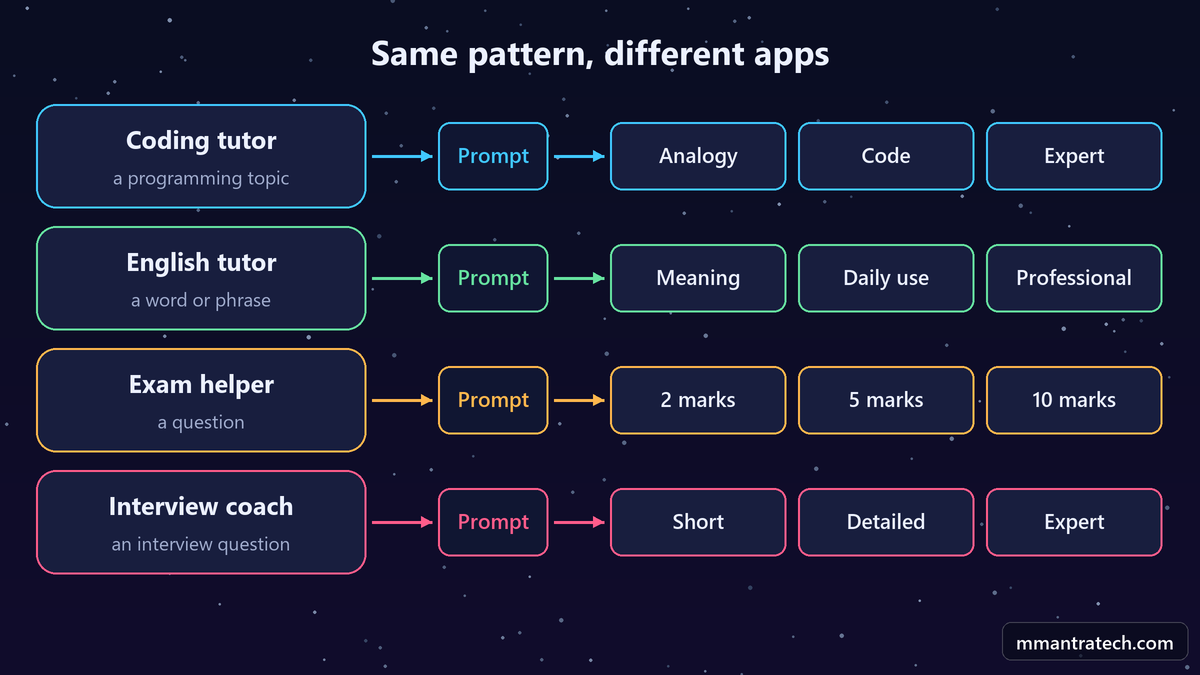
Keep the structure and change only the cards:
- English tutor: Simple meaning, daily conversation, professional usage.
- Exam answer helper: 2-mark, 5-mark and 10-mark answers. Students should still follow their teacher's syllabus and marking scheme.
- Interview coach: Short answer, detailed answer, expert answer with a practical example.
- Product description writer: Beginner, marketing and technical versions. Tell it not to invent specifications.
- Teacher's helper: Parent-friendly, student-friendly and learning-outcome summaries of a lesson.
- Health topic explainer: Simple, everyday and clinical terms. For general education only, never a diagnosis or a replacement for a doctor.
Notice the warnings in that list. When you design an AI app, you also decide what it should refuse to make up. That is a design decision too.
FAQ
What is a Claude Artifact?
It is a standalone output that Claude creates beside your chat, such as a document or an interactive tool. Anthropic's help article on artifacts has the current details.
Can I build an AI app without an API key?
Inside Claude, yes, where the Artifact supports platform-managed AI. A standalone website calling the Anthropic API needs authorized API access, normally through a secure backend.
Will my users need a Claude account?
For a hosted Artifact that uses AI, yes. Each person signs in with their own account, and their use counts toward their own plan.
Can I use this for any programming topic?
Yes, the same prompt works across many topics. The quality still depends on the prompt, the model and the topic, so review the answers.
Can I choose the model and token limit?
Not always. These settings depend on what the Artifact environment supports at that time, so check first instead of assuming every API option is available.
Can I build this as a normal website?
Yes. Build a frontend plus a secure backend that calls the official Anthropic API, and never expose the key in frontend code.
Note: Claude's features, plans and model availability change often. Check Anthropic's official documentation before relying on any specific detail here.
Conclusion
Building an AI coding tutor with Claude Artifacts is a small project that teaches a big lesson. Three takeaways:
- People learn in levels: Analogy, code and precise terms each do a different job.
- AI is one step: The rest is normal app logic.
- Keys need care: Hosted Artifacts manage AI access. Your own website must keep the key on the server.
Now try it yourself. Which topic confused you the most when you were learning? Put it in your tutor, then tell me in the comments if Card 1 finally made it click.



Write a Response