

MCP vs RAG: Which One Does Your AI App Actually Need?
- Posted on October 3, 2026
- Generative AI
- By MmantraTech
- 82 Views
Every few weeks a hot take goes viral: "MCP just killed RAG. Delete your vector database." Picture a team that believes it. They rip out their document search, wire their support bot to a dozen shiny MCP servers, and ship. On day one, a customer asks, "What's your refund rule for spilled food?" The bot calls every tool it has and still has no idea. The rule lives in a PDF, and nothing is searching PDFs anymore.
That mistake comes from treating MCP vs RAG as a competition. In this article you will learn what each one really does, where each fits in an AI app's architecture, when you need one, the other or both, and you will see them working together in real, tested Python code.
Table of Contents
- The short answer
- Two questions, two completely different problems
- RAG in 60 seconds
- MCP in 60 seconds
- MCP vs RAG: side-by-side comparison
- MCP is the door, RAG can be the room behind it
- External data does not automatically mean RAG
- Code: one MCP server with a RAG tool and a SQL tool
- MCP and RAG working together inside an agent
- The 3-layer view of every AI app
- Which one does your AI app need?
- 3 myths about MCP and RAG
- Conclusion
The short answer
RAG (Retrieval-Augmented Generation) is a technique for finding the right knowledge and handing it to an LLM. MCP (Model Context Protocol) is a standard for connecting AI applications to tools, data and systems. One is about what the AI knows; the other is about what the AI can reach and do.
They are not rivals. They sit at different layers of an AI application, and most serious AI products use both.
Two questions, two completely different problems
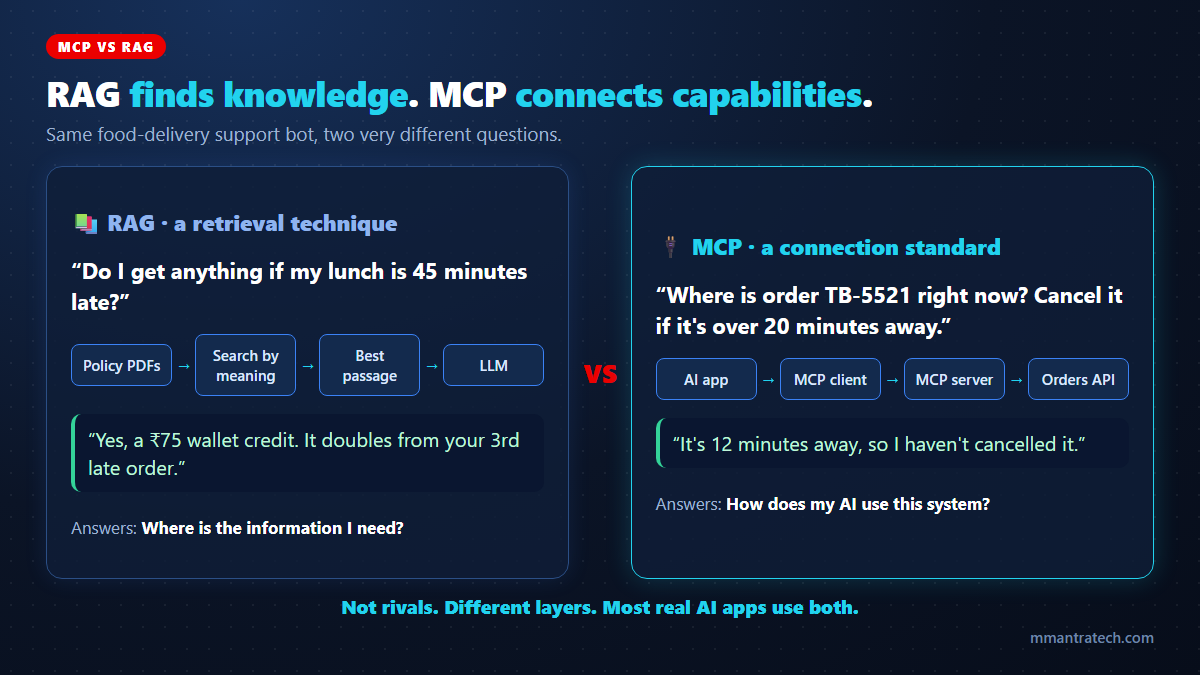
Throughout this article we will use one running example: a food-delivery app we will call TiffinBox, which wants an AI support assistant. Look at two messages it receives in the same minute:
- "Do I get anything if my lunch is 45 minutes late?" The answer is written in a policy document. The AI must find the right paragraph among hundreds of pages.
- "Where is order TB-5521 right now?" The answer changes every minute and lives in the live orders system. No document will ever contain it. The AI must connect to that system.
The doctor analogy
A good doctor does two very different things during your visit. First, they read: your medical history and, when needed, the latest treatment guidelines. Second, they act through hospital systems: ordering a blood test, booking a scan, sending a prescription, all through standard forms every department understands.
Reading the right pages is RAG. Using a standard way to request actions from many departments is MCP. Nobody asks whether a doctor should read or order tests. They need both.
RAG in 60 seconds
Retrieval-Augmented Generation answers questions from a large pile of mostly unstructured content, such as PDFs, wikis, manuals, policies and support articles, that the LLM was never trained on.
- Prepare: Split documents into small chunks, convert each chunk into an embedding (a list of numbers that captures meaning), and store them in a vector database.
- Retrieve: When a question arrives, find the chunks whose meaning is closest, ideally with keyword search, metadata filters and re-ranking on top.
- Augment and generate: Place those few chunks in the prompt and let the LLM write a grounded answer, with sources.
The magic of RAG is search by meaning. "Do I get anything for a late lunch?" can match a paragraph titled "Late delivery compensation" even though the words barely overlap. For the full pipeline with diagrams, read our deep dive into how RAG works.
MCP in 60 seconds
The Model Context Protocol is an open standard, now governed by the Agentic AI Foundation under the Linux Foundation, for plugging AI applications into the outside world. Instead of writing custom glue code for every app-and-service pair, a service exposes an MCP server once, and any MCP-compatible app (Claude, ChatGPT, Cursor, VS Code or your own agent) can use it.
- Host: The AI app the user talks to.
- MCP client: The connector inside the host that speaks the protocol.
- MCP server: Exposes tools (actions like
get_order_status), resources (readable data like a file or schema) and prompts (reusable templates).
The AI discovers the available tools, reads their descriptions, and asks the host to call the right one with the right inputs. New to MCP? Start with our beginner walkthrough of the Model Context Protocol.
MCP vs RAG: side-by-side comparison
| RAG | MCP | |
|---|---|---|
| What it is | A retrieval technique | A communication standard (protocol) |
| Core job | Find relevant knowledge for the LLM | Let AI apps discover and use external capabilities |
| Best with | Unstructured text: PDFs, docs, wikis, tickets | Live systems: databases, APIs, SaaS apps, files |
| Typical question | "What does our policy say about…?" | "Check, create, update or send…" |
| Key parts | Chunking, embeddings, vector search, re-ranking | Host, client, server, tools, resources, prompts |
| Success measured by | Retrieval relevance and answer faithfulness | Interoperability, reuse and correct tool calls |
| Can it take actions? | No, it only reads | Yes, through tools (with permissions) |
The simplest mental model: RAG answers "where is the information I need?" while MCP answers "how does my AI use this system in a standard way?"
MCP is the door, RAG can be the room behind it
Here is the point that clears up most of the confusion: MCP does not decide how a tool works inside. It only standardises how a tool is listed, described and called.
Think of MCP as a building with identical, well-labelled doors. Every visitor knows how to knock and ask for something. What happens behind each door is up to the owner. One room might hold a librarian searching thousands of documents (RAG). Another might hold a clerk looking up a single record (SQL). A third might hold a cashier who moves money (a payments API).
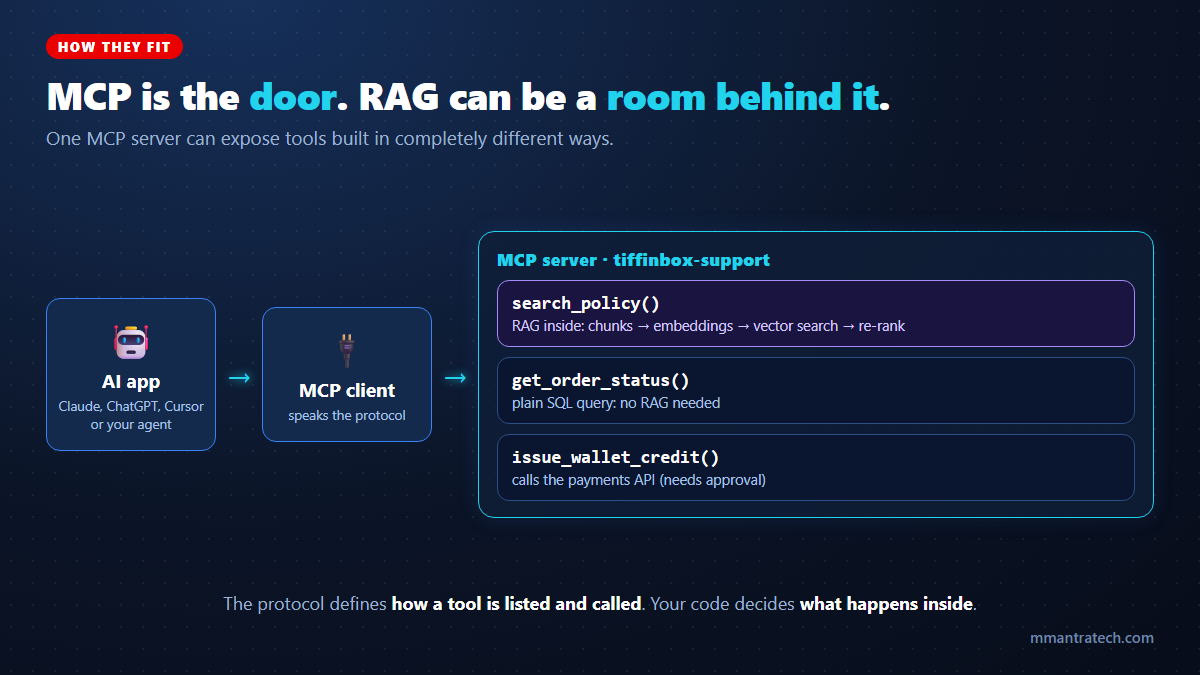
So "Can an MCP tool use RAG?" Absolutely. A search_policy tool can run a full RAG pipeline internally. In that design, MCP exposes the capability and RAG powers it. The two are working at different layers, not competing for the same job.
External data does not automatically mean RAG
A very common beginner mistake, which shows up in developer forums again and again, is to push everything into a vector database, including order tables, inventory counts and prices. Then the team wonders why "How many orders did we deliver yesterday?" returns a vague paragraph instead of a number.
Embeddings are built to find similar meaning. They are not built for exact counts, totals, filters or the current status of record #TB-5521. Structured facts deserve a structured query.
| Question | Data type | Right approach |
|---|---|---|
| "Where is order TB-5521?" | Structured, live | SQL or API tool |
| "How many orders were late last week?" | Structured, aggregate | SQL tool |
| "What is the refund rule for spilled food?" | Unstructured text | RAG |
| "Why do customers in Hyderabad complain most?" | Unstructured reviews at scale | RAG plus summarisation |
Rule of thumb: if a normal SQL query or API call can answer it exactly, do not turn it into a semantic search problem.
Code: one MCP server with a RAG tool and a SQL tool
Let us prove the "door and room" idea in code. This server exposes two tools through MCP. search_policy uses RAG (ChromaDB with its built-in embedding model). get_order_status uses a plain SQLite query. Any MCP-compatible AI app can use both, without knowing or caring how each one works inside.
# Install the MCP Python SDK (v2) and ChromaDB
pip install "mcp[cli]" chromadb
# tiffinbox_server.py - one MCP server, two very different tools behind the same "door"
import sqlite3
import chromadb
from mcp.server.mcpserver import MCPServer
mcp = MCPServer("tiffinbox-support")
# Knowledge layer: policy documents indexed for RAG (semantic search)
policies = chromadb.Client().get_or_create_collection("policies")
policies.add(
ids=["late", "cold", "cancel"],
documents=[
"Late delivery compensation: if an order is delivered more than 30 minutes late, the customer "
"gets a Rs 75 wallet credit. From the third late order in a month, the credit doubles to Rs 150.",
"Damaged food refund: if food arrives cold or spilled, share a photo within 2 hours for a full refund.",
"Cancellation: orders can be cancelled free of charge until the kitchen starts cooking.",
],
)
# Live data layer: orders live in a normal database (no RAG needed)
db = sqlite3.connect(":memory:", check_same_thread=False)
db.execute("CREATE TABLE orders (id TEXT, status TEXT, eta_minutes INTEGER)")
db.execute("INSERT INTO orders VALUES ('TB-5521', 'out_for_delivery', 12)")
@mcp.tool()
def search_policy(question: str) -> str:
"""Search TiffinBox refund, delay and cancellation policies. Use for 'what is the rule' questions."""
hits = policies.query(query_texts=[question], n_results=1)
return hits["documents"][0][0]
@mcp.tool()
def get_order_status(order_id: str) -> str:
"""Get the live status and ETA of an order by its ID, for example TB-5521."""
row = db.execute("SELECT status, eta_minutes FROM orders WHERE id = ?", (order_id,)).fetchone()
return f"{order_id}: {row[0]}, arriving in {row[1]} min" if row else f"No order found: {order_id}"
if __name__ == "__main__":
mcp.run() # stdio transport by defaultOpen it in the MCP Inspector with mcp dev tiffinbox_server.py, or add it to Claude Desktop, Cursor or VS Code. Calling the tools gives:
search_policy("My lunch was delivered 45 minutes late. Do I get compensation?")
-> Late delivery compensation: if an order is delivered more than 30 minutes late, the customer
   gets a Rs 75 wallet credit. From the third late order in a month, the credit doubles to Rs 150.

search_policy("the dal was spilled all over the bag")
-> Damaged food refund: if food arrives cold or spilled, share a photo within 2 hours for a full refund.

get_order_status("TB-5521")
-> TB-5521: out_for_delivery, arriving in 12 min
Two lessons hidden in this output
- "Dal spilled all over the bag" found the damaged-food rule without sharing the word "refund." That is RAG doing its job, sitting quietly behind an MCP door.
- Retrieval quality still matters. When we tested a vaguer question, "food came very late again, any credit?", this tiny demo returned the cold-food policy instead, because the word "food" pulled it off course. Clear chunk titles helped a lot, and production systems add hybrid search and re-ranking for exactly this reason. MCP cannot fix bad retrieval; only better RAG can.
Note: version 2 of the official Python SDK renamed FastMCP to MCPServer. If you are following an older tutorial that imports mcp.server.fastmcp, either update the import as shown above or install "mcp[cli]<2".
MCP and RAG working together inside an agent
Now the real-world case. A frustrated customer writes: "Third late lunch this month. 45 minutes again! What will you do about it?" No single technique can handle this. An AI agent coordinates several:
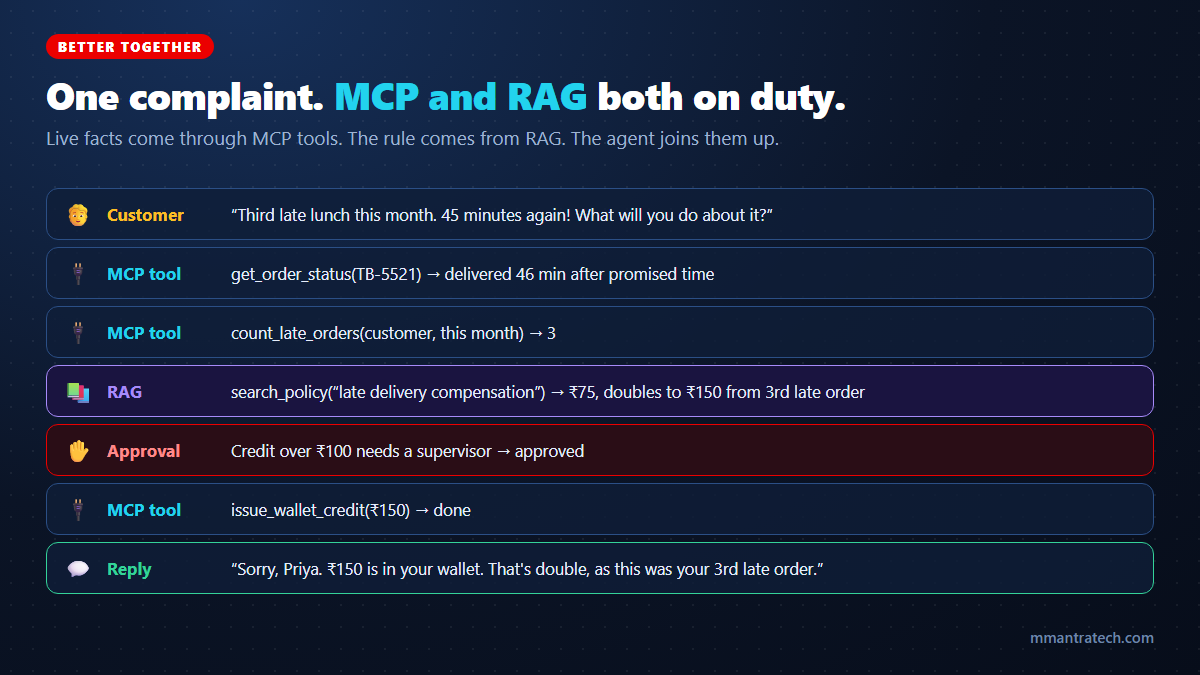
- MCP tool:
get_order_statusconfirms the order arrived 46 minutes after the promised time. - MCP tool:
count_late_ordersconfirms it is the third late order this month. - RAG:
search_policyretrieves the compensation rule: ₹75, doubling to ₹150 from the third late order. - Human approval: Credits above ₹100 need a supervisor's click.
- MCP tool:
issue_wallet_creditadds ₹150. - LLM: Writes a warm, specific reply that explains why the credit was doubled.
Remove RAG and the agent invents a compensation amount. Remove MCP tools and it can quote the policy but cannot check the order or pay the credit. Together, the assistant is both correct and useful.
The 3-layer view of every AI app
The cleanest way to stop the MCP vs RAG debate is to stop comparing them and stack them. Every capable AI application answers three separate questions:
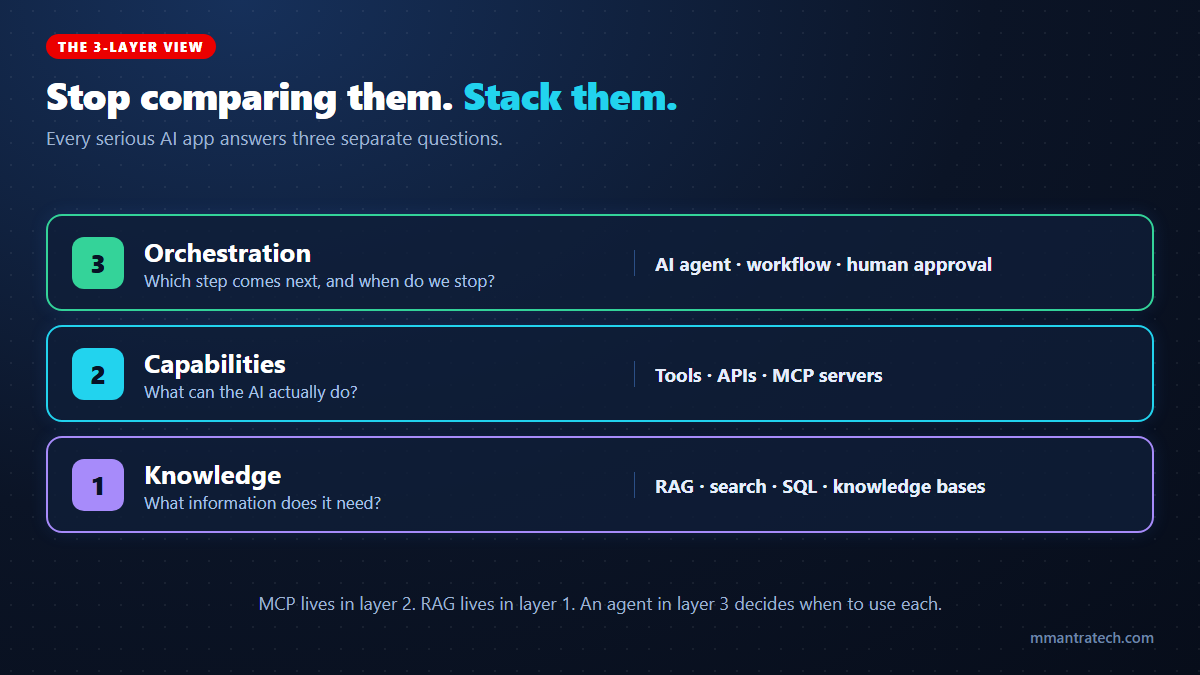
- Knowledge layer: What information do we need? RAG, search, SQL and knowledge bases.
- Capabilities layer: What can the AI actually do? Tools, APIs and MCP servers.
- Orchestration layer: In what order, and when should we stop or ask a human? Agents and workflows.
Once you see the layers, the architecture decisions become obvious. You are not choosing between MCP and RAG; you are deciding what each layer of your app needs.
Which one does your AI app need?
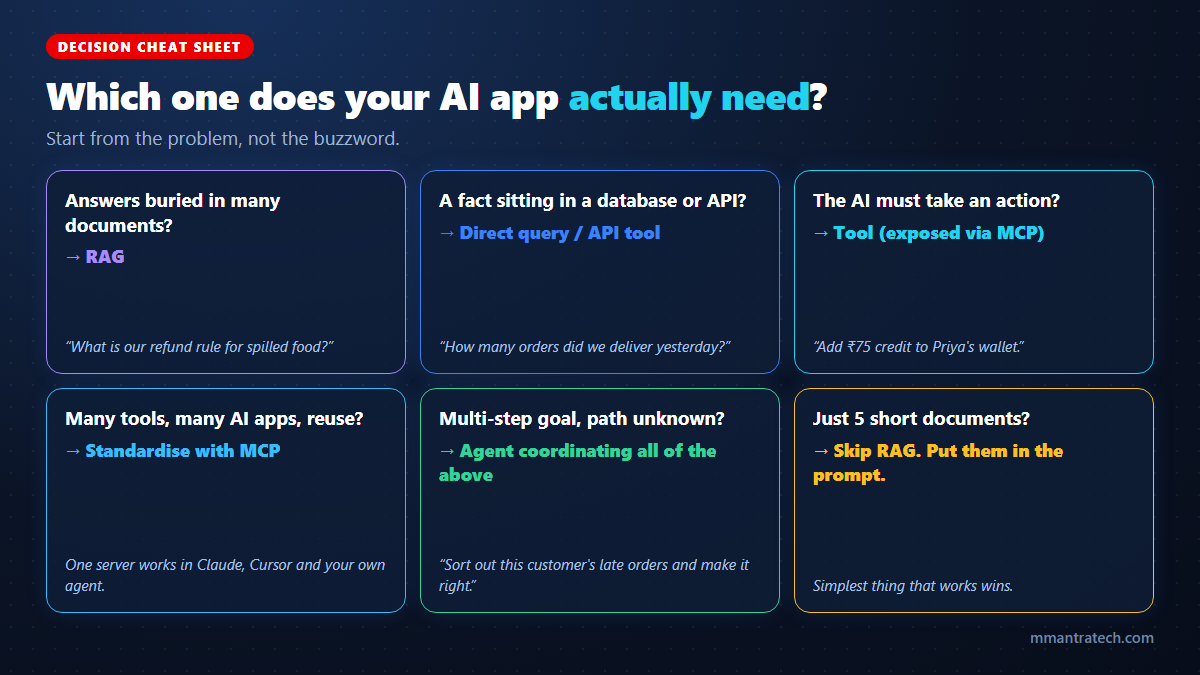
You need RAG when…
- Answers are buried in many documents too large to paste into a prompt.
- Content changes often and retraining a model is out of the question.
- Users need answers with sources they can verify.
You need MCP when…
- Your AI must read live data or take actions in real systems.
- The same tools should work across several AI apps (Claude, Cursor, your own agent) without rewriting integrations.
- You want to use the growing catalogue of ready-made MCP servers for GitHub, Slack, databases, Figma and more.
You may need neither when…
- You have just five short documents. Put them straight in the prompt; modern context windows handle that easily.
- You have one internal app calling one function. Plain function calling in your LLM SDK is enough. MCP pays off when tools are shared and reused.
The best architecture is the simplest one that reliably solves the problem, not the one with the most buzzwords on the slide.
3 myths about MCP and RAG
Myth 1: "MCP killed RAG"
MCP gives AI a standard way to reach systems. It does not search a million documents by meaning. If your knowledge lives in PDFs and wikis, something still has to retrieve the right paragraph. That something is RAG, possibly exposed through an MCP tool.
Myth 2: "MCP resources replace a vector database"
MCP resources let an app read specific data, such as a file or a database schema, by its address. That is useful, but it is "open this exact file," not "find the three most relevant paragraphs across 40,000 files." Search is still a retrieval problem.
Myth 3: "Huge context windows make both unnecessary"
Pasting your entire knowledge base into every prompt is slow, expensive and less accurate for facts buried in the middle. And no context window, however large, can check today's live order status or issue a refund. Retrieval and tools remain essential.
A quick security note
Both layers can be attacked. A poisoned document can smuggle instructions into RAG results, and a malicious MCP server can hide instructions in its tool descriptions. Treat retrieved text and tool output as data, never commands, enforce permissions inside every tool, and require human approval for anything involving money or deletion.
Conclusion
The MCP vs RAG question has a satisfying answer: it was never a fight. RAG helps your AI find the right knowledge. MCP helps your AI connect to systems in a standard way. An agent decides when to use each.
Three key takeaways:
- Different layers: RAG is knowledge retrieval; MCP is a connection standard for tools, resources and prompts.
- They combine naturally: A RAG pipeline can live behind an MCP tool, right next to SQL and API tools.
- Match the tool to the data: Documents call for RAG, structured facts for direct queries, and actions for tools exposed through MCP.
Try it yourself: run the TiffinBox server above, connect it to your favourite AI app, and add a third tool of your own. Which would you build first, a RAG tool or an action tool? Tell us in the comments.

Write a Response