

Retrieval-Augmented Generation (RAG): How AI Gets Better Answers
- Posted on October 3, 2026
- Generative AI
- By MmantraTech
- 97 Views
A beginner-friendly guide to Retrieval-Augmented Generation (RAG): chunking, embeddings, vector databases, hybrid search, re-ranking and a working Python example.
A customer asks your shiny new AI support bot, "Can I return the earbuds I opened 20 days ago?" The bot answers instantly: "Yes, returns are accepted within 30 days!" One problem: your store's policy clearly says opened audio products cannot be returned. The AI never read your policy. It simply guessed what most stores do.
This is exactly the gap that Retrieval-Augmented Generation (RAG) closes. In this guide you will learn what RAG is, how it works step by step (chunking, embeddings, vector search, re-ranking), how to build a tiny RAG app in Python, and the mistakes that quietly break real-world RAG systems.
Table of Contents
- What is RAG? The smart new employee analogy
- Why LLMs need RAG
- How RAG works: two pipelines
- Step 1: Chunking documents the right way
- Step 2: Embeddings and semantic search
- Step 3: Vector databases and metadata
- Step 4: Smarter retrieval with hybrid search and re-ranking
- Step 5: Augment the prompt and generate
- Build a mini RAG app in Python
- RAG vs fine-tuning vs long context
- Advanced RAG: what modern systems add
- Common RAG mistakes and how to measure quality
- Conclusion
What is RAG? The smart new employee analogy
Imagine hiring a brilliant graduate. On day one they can write emails, analyse data and explain complex ideas. But ask them, "What is our leave policy?" or "Which discount code is live this week?" and they have no clue. They are smart, but they have not read your company's documents yet.
You would not send them back to college. You would hand them the right page of the handbook and say, "Read this, then answer." That is RAG in one sentence.
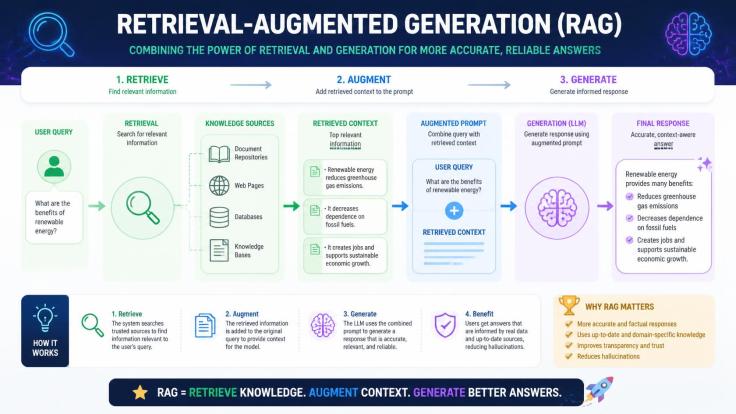
Retrieval-Augmented Generation (RAG) is a technique where an AI system first retrieves relevant information from an external knowledge source, augments the prompt with it, and then lets the LLM generate an answer grounded in that information.
Breaking down the name
- Retrieval: Search your documents and find the few passages that relate to the question.
- Augmentation: Paste those passages into the prompt, next to the user's question.
- Generation: The LLM reads the passages and writes a natural, conversational answer.
Many educators describe this as the difference between a closed-book exam (answer from memory) and an open-book exam (look up the right page first). The model's intelligence stays the same; what changes is the material on its desk.

Why LLMs need RAG
Large Language Models are trained once on a massive snapshot of text. That design creates four practical problems for any business that wants to use them.
1. Their knowledge has an expiry date
Every model has a training cut-off. Your new product launched last month, the tax rule changed last week, the price list updated this morning. None of that is inside the model. RAG fetches the latest version at question time.
2. They have never seen your private data
Your HR handbook, sales playbook, support tickets and contracts were never on the public internet, so no model was trained on them. Ask "What is this week's Diwali sale discount code?" and only your own knowledge base knows.
3. They guess when they do not know
An LLM is built to produce fluent text, not to admit ignorance. Without facts in front of it, it often hallucinates, inventing confident answers like the earbuds example above. Giving it the right passage dramatically reduces this.
4. Users need proof
In banking, healthcare, law or HR, "trust me" is not good enough. Because RAG knows which document each fact came from, it can show sources like "Returns Policy, section 4.2," so users can verify the answer themselves.
How RAG works: two pipelines
A RAG system is easier to understand once you see that it is really two separate pipelines that share one storage layer.
- Indexing pipeline (preparation): Runs once, and again whenever documents change. It converts your documents into a searchable library.
- Answering pipeline (live): Runs every time a user asks something. It searches that library and builds the answer.

Let us walk through each stage using one running example: an online gadget store we will call GadgetGully, which wants an AI assistant that answers from its own policies, FAQs and troubleshooting guides.
Step 1: Chunking documents the right way
GadgetGully has 3,000 documents, some of them 80 pages long. Sending all of that to the LLM for every question would be slow, expensive and confusing. So the first job is to cut the documents into small, searchable pieces called chunks, usually a few paragraphs each.
Think of it like a textbook index. You do not reread the entire book to find "photosynthesis"; you jump to page 112. Chunks are those pages.
Why careless chunking gives wrong answers
Here is where many beginner RAG projects fail. If you blindly cut every 200 words, a rule and its exception can land in different chunks:

The fix shown above is chunk overlap: each chunk repeats the last sentence or two of the previous one, so information that crosses a boundary survives in at least one chunk.
Popular chunking strategies
- Fixed size with overlap: Simple and fast. A common starting point is 300–500 tokens with about 10–20% overlap.
- Structure-aware: Split on headings, sections, list items or table rows. Great for manuals and policies.
- Sentence window: Search on single sentences, but hand the LLM the surrounding sentences too.
- Semantic chunking: Start a new chunk where the topic actually changes, detected using embeddings.
Rule of thumb: a chunk should make sense if someone reads it alone, with no other page open.
Step 2: Embeddings and semantic search
Now GadgetGully has 2,00,000 chunks. How do we find the right ones for a question? Plain keyword search is not enough, because customers rarely use the same words as your documents.
The kirana shop analogy
Walk into a local kirana store and say, "Bhaiya, something for a headache." The shopkeeper hands you a paracetamol strip, even though you never said "paracetamol." He understood your meaning, not your exact words. Embeddings give computers that same skill.
What is an embedding?
An embedding is a list of numbers (a vector) that captures the meaning of a piece of text. An embedding model reads a sentence and outputs something like [0.12, -0.48, 0.91, ...], usually with hundreds or thousands of numbers.
The individual numbers do not mean anything to humans. What matters is that sentences with similar meaning get similar vectors, so they sit close together in this "meaning space."

Measuring closeness with cosine similarity
To compare two vectors, most RAG systems use cosine similarity. Picture each vector as an arrow from the centre. If two arrows point in nearly the same direction, the texts mean similar things (score close to 1). If they point in very different directions, the score drops towards 0.
Here is a toy example with tiny 3-number vectors so you can see the maths in action:
# Cosine similarity with toy 3-dimensional "embeddings"
import math

def cosine(a, b):
    dot = sum(x * y for x, y in zip(a, b))
    return dot / (math.sqrt(sum(x * x for x in a)) * math.sqrt(sum(y * y for y in b)))

query        = [0.9, 0.1, 0.2]   # "low-cost plane tickets to Goa"
cheap_flight = [0.8, 0.2, 0.1]   # "cheap flights to Goa"
fish_curry   = [0.1, 0.9, 0.3]   # "Goan fish curry recipe"

print(round(cosine(query, cheap_flight), 2))  # 0.99 -> very similar
print(round(cosine(query, fish_curry), 2))    # 0.27 -> not related
Real embedding models do exactly this, just with 384, 768 or 1,536+ dimensions instead of three. Other measures such as dot product and Euclidean distance exist too; the right one depends on the embedding model you use.
Step 3: Vector databases and metadata
Comparing a question against 2,00,000 vectors one by one for every query would be too slow. A vector database stores embeddings in special indexes that find the nearest matches in milliseconds, even across millions of chunks.
Popular choices
- Chroma and FAISS: Lightweight, great for learning and prototypes.
- pgvector: Adds vector search to PostgreSQL, so you can keep using the database you already know.
- Qdrant, Weaviate, Milvus, Pinecone: Built for large production workloads, with filtering and scaling features.
Metadata: the label on every chunk
Alongside each vector, you store metadata, which is information about the chunk rather than the chunk itself. For example: source file, department, product, page number, last-updated date and whether it is still current.
Why does this matter? Imagine GadgetGully's knowledge base still contains a three-year-old warranty policy offering 2 years of coverage, while the current one offers 1 year. Both chunks look almost identical to an embedding model. Without metadata, your bot might happily promise a 2-year warranty.
With a metadata filter like status = current and product = smartwatch, the old policy never even enters the search. Filtering also shrinks the search space, which makes retrieval faster and more accurate.
Step 4: Smarter retrieval with hybrid search and re-ranking
Basic RAG takes the question, embeds it and grabs the top few closest chunks. That works in demos. In production, three upgrades make a huge difference.
Hybrid search: keywords + meaning
Suppose a user types: "Why is my payment stuck with error PAY-402?" Vector search understands "payment stuck" but can be fuzzy with exact codes like PAY-402, order IDs or model numbers. Classic keyword search (BM25) is excellent at exact terms but misses paraphrases.
Hybrid search runs both and merges the results. Benchmarks published by many teams consistently show the combination beats either method alone, which is why it has become the default in modern RAG stacks.
Re-ranking: a second, sharper opinion
The first search is fast but rough. A re-ranker (usually a cross-encoder model) then reads the question and each candidate chunk together and scores how well that chunk actually answers the question. You retrieve around 50 candidates and keep only the best 5.
Query rewriting
Users type messy questions like "it's not working since update??". A query-rewriting step uses the LLM to turn this into something searchable, such as "app not working after latest update, troubleshooting steps," and sometimes into several sub-questions.

Step 5: Augment the prompt and generate
Now we have the top five chunks. The augmentation step places them into a carefully written prompt, and the LLM generates the final answer. The instructions matter as much as the retrieved text.
# Example RAG prompt template sent to the LLM
You are GadgetGully's support assistant.
Answer ONLY using the context below.
If the answer is not in the context, say "I couldn't find this in our policies"
and suggest contacting support. Cite the source in brackets.

Context:
[1] Returns Policy §4.2: Returns are accepted within 30 days of delivery,
    except for opened audio products...
[2] Refunds FAQ: Refunds are processed within 5-7 working days...

Question: Can I return the earbuds I opened 20 days ago?
Three lines in that template do the heavy lifting: answer only from context (reduces guessing), admit when the answer is missing (prevents made-up policies), and cite the source (builds trust). The result: "No. Opened audio products can't be returned under our Returns Policy [1]."
Build a mini RAG app in Python
Let us turn theory into code. This example uses ChromaDB, which ships with a small built-in embedding model, so you can run it locally without any API key. It covers chunks, embeddings, metadata filtering and retrieval.
# Install ChromaDB (first run downloads a small embedding model)
pip install chromadb
# mini_rag.py - store policy chunks, then retrieve the best match for a question
import chromadb
client = chromadb.Client()
kb = client.create_collection("gadgetgully_kb")
kb.add(
ids=["ret-1", "war-old", "war-new", "ship-1"],
documents=[
"Returns are accepted within 30 days of delivery, except for opened audio products such as earbuds and headphones.",
"Smartwatches come with a 2-year manufacturer warranty.",
"Smartwatches come with a 1-year manufacturer warranty covering hardware defects.",
"Orders above Rs 499 ship free. Delivery takes 3-5 working days.",
],
metadatas=[
{"topic": "returns", "status": "current"},
{"topic": "warranty", "status": "archived"},
{"topic": "warranty", "status": "current"},
{"topic": "shipping", "status": "current"},
],
)
def retrieve(question, k=1):
result = kb.query(query_texts=[question], n_results=k, where={"status": "current"})
return result["documents"][0]
print(retrieve("Can I send back headphones I already unboxed?"))
print(retrieve("How long is the guarantee on my smart watch?"))Run it and you get output similar to this:
['Returns are accepted within 30 days of delivery, except for opened audio products such as earbuds and headphones.']
['Smartwatches come with a 1-year manufacturer warranty covering hardware defects.']
Notice two things. First, "send back headphones I already unboxed" found the returns rule even though the words "return" and "opened" never appeared in the question. That is semantic search. Second, the outdated 2-year warranty was never returned, because the metadata filter excluded archived chunks.
To complete the pipeline, place the retrieved text into the prompt template from Step 5 and send it to any LLM API (Claude, GPT, Gemini or a local model). That final call is the "G" in RAG.
RAG vs fine-tuning vs long context
RAG is not the only way to give an LLM extra knowledge. Here is how it compares with the two common alternatives.
| Approach | Best for | Weak spot |
|---|---|---|
| RAG | Private, frequently changing facts; answers with sources | Quality depends on retrieval; more moving parts |
| Fine-tuning | Changing style, tone, format or teaching a specialised skill | Costly to repeat; poor for facts that change weekly |
| Long context | Analysing a few large documents in one go | Expensive and slow per query; recall drops in very long inputs |
A simple way to remember it: fine-tuning changes how the employee behaves; RAG changes what they can look up. You might fine-tune a model to always reply in your brand's friendly tone, and use RAG so it quotes this week's price list.
Is RAG dead now that context windows hold a million tokens?
This debate trends every few months. Today's models can read hundreds of thousands of tokens at once, so why not paste the whole knowledge base into every prompt? In practice, three reasons keep RAG alive:
- Cost and speed: Sending a huge context with every question costs far more and responds far more slowly than sending five well-chosen chunks.
- Accuracy: Research has repeatedly shown that models are less reliable at finding facts buried in the middle of very long inputs.
- Scale and security: A real company knowledge base is far bigger than any context window, and each user should only see documents they are allowed to see.
The emerging answer is "both": use RAG to pick the right material, and use long context to read more of it when a question truly needs it.
Advanced RAG: what modern systems add
The basic retrieve-then-generate loop is now called naive RAG. Production systems layer on several improvements.
Contextual retrieval
A chunk like "It is valid for 30 days" is meaningless alone. What is "it"? Contextual retrieval uses an LLM to prepend a short summary to each chunk before embedding, such as "From GadgetGully's Returns Policy, about return windows: ..." Anthropic reported that this, combined with hybrid search and re-ranking, cut failed retrievals by around two-thirds in its tests.
GraphRAG
Some questions need connected facts: "Which suppliers of our best-selling smartwatch also had late deliveries last quarter?" GraphRAG builds a knowledge graph of entities and relationships, so the system can hop from product to supplier to delivery record instead of hoping one chunk contains everything.
Agentic RAG
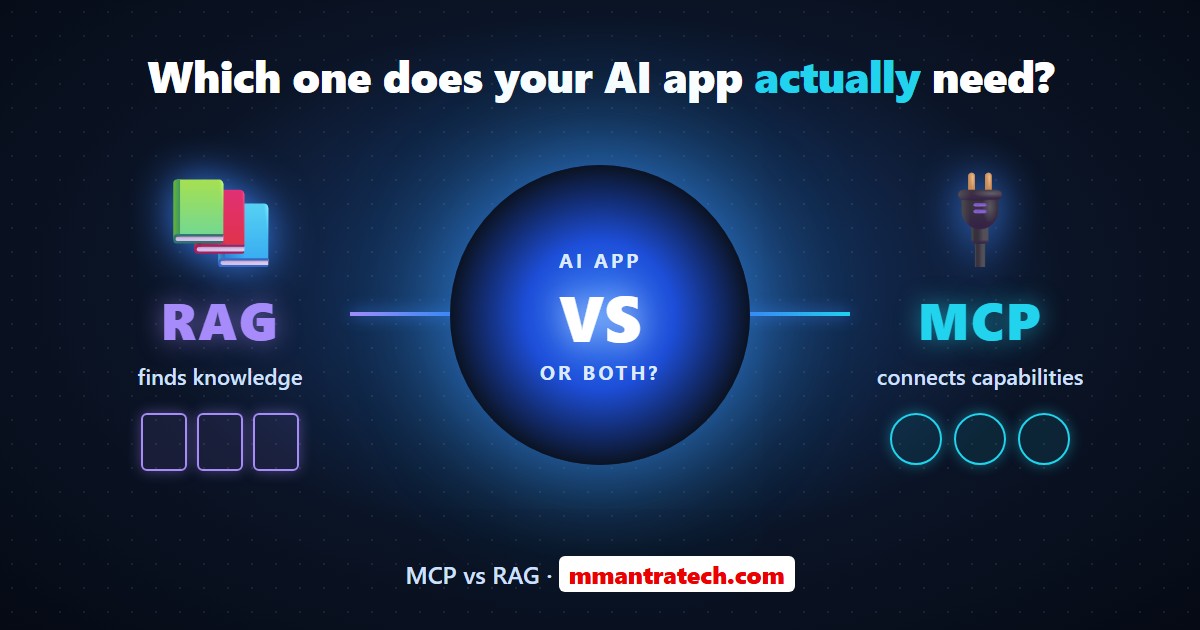
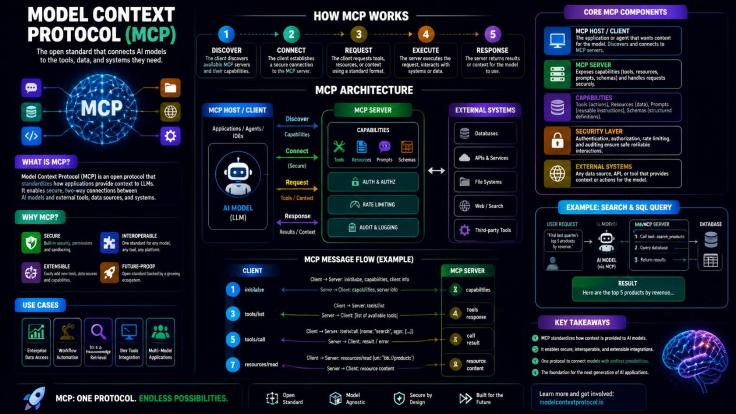
In agentic RAG, the AI decides how to retrieve. It might search the FAQ, realise the answer needs live order data, call an order-status tool, then combine both. Tools like these are increasingly connected through standards such as the Model Context Protocol (MCP).
Multimodal RAG
Not all knowledge is text. Modern pipelines also retrieve from scanned PDFs, tables, screenshots, product images and even video transcripts.
Common RAG mistakes and how to measure quality
Building a RAG demo takes an afternoon. Building one people can trust takes discipline. These are the mistakes that show up again and again in developer forums.
- Chunks that are too big or too small: Too big buries the answer in noise; too small loses context. Test a few sizes on real questions.
- Stale documents: Old policies in the index produce confidently outdated answers. Add dates and status metadata, and re-index on every update.
- Vector search only: Exact codes, SKUs and names slip through. Add keyword search for hybrid retrieval.
- Stuffing too much context: Twenty chunks "just in case" dilutes focus and raises cost. Re-rank and keep the best few.
- Ignoring permissions: An intern asking "What is the CFO's salary?" must not retrieve the payroll sheet. Apply access control during retrieval, not after the answer.
- Trusting retrieved text blindly: A document or web page can contain hidden instructions ("ignore previous rules..."). Treat retrieved content as data, never as commands.
How to evaluate a RAG system
Do not judge RAG by "it looks right." Build a test set of 50–100 real questions with known answers, and track three scores, often called the RAG triad:
- Context relevance: Did retrieval find the chunks that contain the answer?
- Faithfulness (groundedness): Is every claim in the answer supported by those chunks?
- Answer relevance: Does the answer actually address what the user asked?
Open-source tools such as Ragas, TruLens and DeepEval can score these automatically. When an answer is wrong, these scores tell you whether to fix retrieval or generation, which saves hours of guesswork.
Bad retrieval cannot be rescued by a smarter LLM. If the right passage never reaches the model, the best it can do is guess politely.
Conclusion
Retrieval-Augmented Generation turns a brilliant but uninformed LLM into an assistant that answers from your own, up-to-date knowledge, with sources to prove it.
Three key takeaways:
- RAG works in two pipelines: index your documents once (chunk, embed, store with metadata), then retrieve, augment and generate for every question.
- Retrieval quality decides answer quality, so invest in smart chunking, hybrid search, metadata filters and re-ranking.
- Measure context relevance, faithfulness and answer relevance, and enforce permissions at retrieval time.
Try it yourself: run the mini RAG script above with your own FAQ or notes, then connect it to an LLM. What would you build first, a policy bot, a study assistant or a code-docs helper? Tell us in the comments.

Write a Response